Sunday, 24 May 2015

Web Apps vs. Native Apps - What Fits Your Business the Best?

Organizations  tend to lean more towards deploying their own business apps as promotional or marketing tools  in order to increase awareness about their services and products. Enterprise app deployment is a multi-step process, starting from idea generation to app testing and deployment. In between, these two steps come application planning, design and development, and documentation

One key decision that makes or breaks the app is whether it  will be installed on the device (native app) or if it will be accessed from a  web-browser (web app). Both native and web apps have their own pros and cons, but we’ve put together a list of factors that affect their viability the most. Let’s look at where both platforms stand with respect to those factors.

Maintenance Costs and Security

To deploy a native app, businesses need to get their applications approved by the relevant app store before it is made available there. ( available where?)  Even though the approval process is time-consuming, it guarantees security and quality, which is critical to an app’s success. That’s what smart phone users look for in mobile apps first.

However, web applications don’t require any approvals, as they are entirely browser-based and don’t have to install  onto the device. Web apps are designed using a common code base that consists of languages such as HTML5, CSS3, JavaScript, or PHP, that makes maintenance easier and increases compatibility considerably. However, since every mobile platform uses a different programming language, a separate application has to be developed for every platform in the case of native apps. This increases both the development and maintenance costs, as well as the complexity. It also makes updates harder to roll out.
Enterprise Native apps vs Web Apps
Native Apps vs Web Apps: Which is Right for Your Enterprise Needs?
Access Based on Operating System or Web Browser

A Native App is built specifically for an operating system. For example, a native app like the app store itself is developed for just that operating system. You can’t install the Google Play Store on a Windows based or iOS based device, and can’t install iTunes on an Android device. Additionally, native apps can easily use the hardware on the device such as the camera with some basic permissions.

Web Apps, on the other hand, are built especially for modern browsers that largely follow the same design principles and standards. They can easily run the code, without much of a problem unless a specific browser on a specific platform has some limitations. An example of this would be the Outlook web app. This app can be accessed from a mobile web browser without installation. However, a Web app has very limited access to the native features of a mobile device.

Updating Different Versions of Applications

As web apps are ‘installed’ on a single server, mobile users would always get the latest version. Developers and business don’t have to worry that much about tech support or update roll-outs. Conversely , native apps need updates rolled out for every platform, making them a hassle to maintain. Because of this, businesses need highly  effective tech support for native app users.

There are several other considerations as well when it comes to the native versus web apps discussion, but these are the most critical. , The right answer depends on each scenario. What might be good for one business might be a failure for another.

Have you considered deploying your own mobile app? What platforms and model are you considering? Do let us know in the comments below and thank you for reading!

Sunday, 3 May 2015

How To Avoid App Store Rejection

In this era of digitization, mobile apps have become vital for their unique and easily adaptable features. However, what we use is the final product after months of development and testing of a mobile app. There are several complicated processes involved in app designing, starting from the basic idea, to its availability for users.

In case you’re a beginner in this field, you may have to go through several iterations before your app gets approved by app stores. This may lead to a lot of frustration because of the rules and  regulations involved in getting your app approved. There can be human errors involved in the development, which you should consider while you’re working on your app. Different app stores have different rules on app quality and functionality, so some stores might approve your app while some reject it.

If you want to keep safe from the frustrating rejections from app stores, here’s what you should do when you submit your app for approval:
Avoid App Store Rejection
Mobile App Store
  • Adhere to the app store guidelines: Read and then re-read the guidelines of the app stores. The features included in the app should be well within the app store rule book. No feature should be included which violates the guidelines and thorough consideration should be given to this aspect.
  • Include a privacy policy: If your app requires an in-app registration but doesn’t include a privacy policy, it can be rejected.
  • Test, Test, and Test: Test your app as many times as you can, to ensure that there aren’t any bugs left when you are submitting the app for review. The more you test your app, the better it will turn out.
  • Add a demo for your app: A demo of how your app will work is useful in two ways – first, it helps convince the reviewer that your app is good to go; secondly, it looks great on your app page when it is available for users. It should cover all significant functions at the very least, explaining how users can benefit from the app.
  • Ask for Personal Information only if it is required: If your app asks users for personal information, you should clarify how this information will be used once collected. If there is no use for that data and you are still asking for it, your app will most likely be rejected.
  • Avoid unnecessary visual add-ons: Overviews of the functionality of the app can also be presented in the form of videos that should include the main purpose of the app. Only use visual add-ons and text if needed, otherwise, videos work best!
  • Don't include dummy data in the app: While submitting your app for review, make sure it doesn’t contain any broken links or dummy data that may have been used at the time of testing. Instead, provide a live environment so that the reviewer can easily check the functionality of the app.
  • Get Help from an experienced developer: You should get the help of a skilled and experienced custom app developer, as they know how to minimize the chances of app rejection.

Have you submitted your app for review yet, or plan to do so in the near future? Have another point you’d like to share with us? Please feel free to leave your comments and input, and thanks for reading!

Tuesday, 7 April 2015

Top Payment Gateway Service Providers in 2015

Setting up an eCommerce store can be pretty straightforward and can be done with the help of various eCommerce platforms and tools available today. But setting up an online payment gateway can get tricky with the complexities and security issues that need to be considered. This article details the best payment gateways to look for in 2015, and how to implement them in your e-commerce store to simplify online payments.

Handling an eCommerce store is not a walk in the park. You need to manage things on multiple fronts to actually create a successful online store. There are various eCommerce modules that need to be given priority, right from inventory, order management and to the most critical module that accepts online payments.

With multiple e-commerce platforms, there are also many complexities involved in payment processing which needs to be simplified. You might be looking for solving confusing questions like

  • Which payment gateway is ideal for my eCommerce store?
  • Which are the top mobile payment gateway providers?
  • How to integrate payment gateway?

Why Do I Need A Payment Gateway?

Payment Gateway Process

Payment Gateway Integration Process

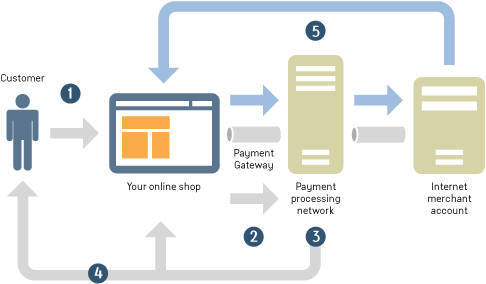
A payment gateway is required to process any credit and/or debit card transactions made through your eStore. It is a middle layer interfacing between the eCommerce store and your merchant account. Several simple payment service providers combine payment gateways and merchant accounts, which makes things easier but limits the flexibility for payment options.

Let’s take a look at the top three online payment gateway service providers for 2015. We’ve done intensive research for you, but feel free to get back to us for helping you choose an ideal payment gateway.

1.PayPal

PayPal is one of the most recommended payment gateway providers for an eCommerce retail store. It offers products like web payments, mobile payments, and online invoicing.

Paypal Payment Gateway
Pros:
  • Accepts Credit, Debit Cards and PayPal
  • Doesn’t require a merchant account
  • No SSL Certificate required
  • Available in more than 190 countries
  • No monthly fee, Reasonable transaction rate: 1.9% – 2.9% + 30 cents per transaction + 3.9% transaction fee + a fixed fee for international sales
To know how to integrate PayPal into your eCommerce store, see this article (http://www.rishabhsoft.com/blog/payment-gateway-integration-android-ios).

2. Authorize.net
Authorize.net is another popular gateway provider.
Pros:
  • Supports mobile payments, recurring billing, in-form payments
  • Accepts payments directly through the Authorize.net
  • PCI compliant, making it easy to obtain SSL certificate
Cons:
  • High fees: $99 + $20 including setup and maintenance cost
  • To process international payments your business must be operational in first world countries like US, Canada, UK, Europe and Australia
  • Requires a merchant account
  • Doesn’t offer volume discounts
3.2CheckOut
2CheckOut – accepts global payments online with hosted checkout and API options.
Pros:
  • Processes major online payment methods
  • Supports mobile payment
  • Don’t need a separate merchant account
  • Present in over 200 countries
  • No monthly fees or hidden fees
Cons:
  • High transaction fee: 5.5% per transaction + 45¢
  • Doesn’t offer volume discounts
  • No hosted checkout page
Conclusion Although PayPal, 2CheckOut and Authorize are the best online payment gateway options available in the market today, they all have their own pros and cons. Depending on your business need, the most suitable option for your eCommerce store needs to be selected. Don’t forget to stay in touch with us by joining our mailing list to keep yourself updated with the latest technology innovations. Please feel free to share your thoughts on using these payment gateways by leaving a comment below. Thank you!